Open the app and sign in
Sign in with Apple, Google, Microsoft, GitHub, a passkey, or an emailed code. Your tables sync across devices, and the board keeps working offline and catches up when you are back online.
NudgeTable is a local-first reminder board for the tasks that matter at home but do not belong behind a one-time alarm. Use it on a wall tablet or any browser, share tables with people, and let the board keep gentle pressure on what is due.
Free. Sign in with Apple, Google, Microsoft, GitHub, a passkey, or an emailed code.
The real path the app takes today — onboarding, table selection, and a sane landing spot — not an aspirational mock.
Sign in with Apple, Google, Microsoft, GitHub, a passkey, or an emailed code. Your tables sync across devices, and the board keeps working offline and catches up when you are back online.
Personal or shared-only — both are first-class. Reminders carry a cadence in days, a soft due date, and a late date. The board warms green → yellow → orange → red as something ages past its expected cadence.
Sign-in, cache clears, and fresh devices reopen the board exactly where you left it — no drifting into a broken "No table" state. The app auto-repairs missing selection instead of guessing.
The board is not locked to one layout. Switch instantly between playful, dense, calendar, and list-based views without changing the underlying reminders.
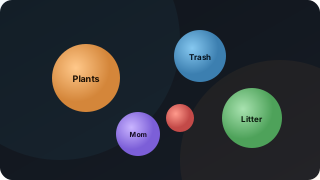
Floating orbs with grouping, orbit-speed tuning, focus bringing, drag-to-rearrange, and labels that stay readable even when bubbles overlap.
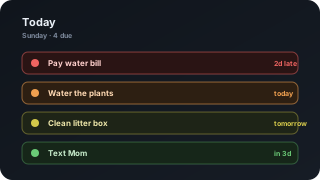
A focused, right-now view for people who want the next important reminders without the rest of the board competing for attention.
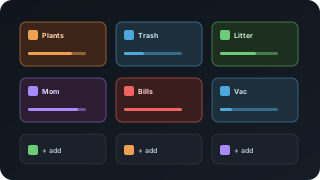
A whole-table scan view with state color, progress bars, and a strong "what matters first" read from the top-left corner.
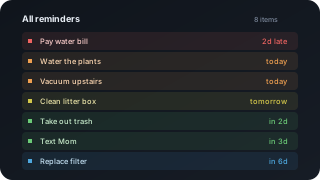
A simple, dense checklist when you want predictable ordering, less motion, and zero ambiguity about what is at the top.
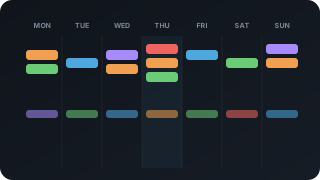
A seven-day planning strip for upcoming work, due clusters, and schedule shifts without losing the recurring cadence underneath.
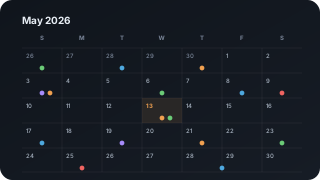
A compact calendar with a dot for every reminder due. Pick a day and its reminders are listed right there, ready to mark done, edit, or add to.
Themes recolor the whole board: background, accents, buttons, cards, and atmosphere. Prism is the newest.
What the app currently supports — not vague roadmap bullets.
Owner, Admin, Contributor, and Viewer roles — including shared-only setups for people who never need a personal table.
Pick where the app should reopen after sign-in or a fresh device. The board repairs missing selection automatically.
CSV and JSON flows both preview before writing, so you can clean up reminders before they hit the board.
Subscribe the board to Apple, Google, or Outlook Calendar, or export individual reminders for one-off handoffs.
Per-device nudges are opt-in, route through encrypted Web Push, and are especially useful once a reminder turns overdue.
Signed HttpOnly session cookies, server-signed invite links, encrypted-at-rest data, TLS 1.3 preferred for all DB and API hops.
Installable, offline-first, readable across the room. Designed to live on a shared household screen — not hide in a browser tab.
Delete your account and we hold the data unchanged for 7 days. Sign back in within the window and tap "Keep my account" to restore.
NudgeTable runs in any browser, and the native apps for iPhone, iPad, and Mac are on the App Store. The Android app is in testing.
Open the live app, read the in-app Help, or check the About page for the current build and privacy / security posture. Free while we are small.